---
title: 'Canonical URL in Joomla: attention to the URL hierarchy'
description: 'Anyone using custom canonical URLs must know how URL hierarchies work in Joomla to avoid harmful errors in SERP ranking.'
lang: en-GB
type: BlogPosting
category: Blog
tags:
- SEO
- Joomla!
image: 'https://www.htmlcrusco.it/images/joomla-canonical-url.jpg'
author:
image: 'https://www.htmlcrusco.it/media/plg_user_cruauthorbiobox/images/authors/7711710768316.svg'
name: 'Luca Gabbiati'
job_title: 'SR Software Developer'
bio: "I love writing code, learning new things, and traveling while reading a good book. Software and books are my Ikigai. Who knows, maybe in a world without one or the other, I wouldn't exist... well, all things considered, it turned out well!"
date: '2024-10-31T09:13:11+00:00'
lastmod: '2025-12-12T11:24:42+00:00'
canonical_url: 'https://www.htmlcrusco.it/en/blog/canonical-url-in-joomla-attention-to-the-url-hierarchy'
---
Designed by [Freepik](https://www.freepik.com/)
- [The plugin](#post-plugin)
- [URL hierarchies in Joomla!](#post-gerarchie)
- [Example](#post-esempio)
- [Conclusions](#post-conclusioni)
## The plugin
If you are reading this article, you already know that **Canonical URLs** have an important part to play in SEO, because they prevent our website from running into the penalties that search engines give for “alleged duplicate content.”
In Joomla! they can be easily managed with the help of [our plugin](https://www.htmlcrusco.it/en/joomla-extensions/crusco-canonical-url-plugin-for-joomla).
This supports their management on **all Joomla elements, Convert Forms and SP Page Builder**, allows a full control over them and can be run in both automatic and manual mode.
In automatic mode (enabled by default), it **automatically creates the correct canonical URLs** by analysing and inspecting the hierarchical structure of content URLs.
In manual mode, the responsibility for such checks lies with the user who enters the **custom canonical URL**.
In the latter context, in order to avoid harmful errors in content indexing, it is important to remember how URL hierarchies work in Joomla!
## URL hierarchies in Joomla!
There are two types of URL hierarchy in Joomla: the **menu** hierarchy and the **component** hierarchy..
The menu hierarchy refers to the arrangement of **menu items and sub-items**.
The component hierarchy is when the elements handled by a component are **grouped by type**.
When we create an article and assign it to a category, the "com\_content" component creates a hierarchical *parent-child* relationship, where the category is the parent and the article is the child.
Our plugin allows you to place **custom canonical URLs** on menu items as well.
This option could be useful for **third-party Joomla! extensions**, but we must be very careful, because a wrongly set canonical URL on a menu item can also be shown where it is not desired.
## Let's take an example
Let's take an example to make this concept clearer.
Suppose you have a website that has the following menu entries, content and custom canonical URLs.
**MENU**
- Home → `https://mysite.com/`
- Services → `https://mysite.com/services`
- E-learning → `https://mysyte.com/elearning`
- Software Development → no canonical
- Blog → `https://mysite.com/blog`
- Get a quote → `https://mysite.com/get-a-quote`
All entries refer to static content with no *parent-child* hierarchical relation, apart from Blog, which, as we shall see, refers to a category of articles.
**CONTENTS**
- Blog (Category) → `https://mysite.com/blog`
- Best Dart server (Article) → `https://mysite.com/blog/best-dart-server`
- Cassiopeia how to (Article) → `https://mysite.com/blog/cassiopeia-how-to`
- BSD for dummies (Article) → no canonical
In this situation, canonicals will be:
- `https://mysite.com/` for **Home**
- `https://mysite.com/services` for **Services**
- `https://mysyte.com/elearning` for **E-learning**
- **Software Development** will not have a canonical, because it has its own menu item that lacks it and cannot inherit it from **Services** as static content without a *parent-child* hierarchical relationship.
- `https://mysite.com/get-a-quote` for **Get a quote**
- `https://mysite.com/blog` for **Blog**
- `https://mysite.com/blog/best-dart-server` for **Best Dart server**
- `https://mysite.com/blog/cassiopeia-how-to` for **Cassiopeia how to**
- `https://mysite.com/blog` for the article **BSD for dummies**
Why is the canonical URL of **Blog** used for the **BSD for dummies** article?
The reason is that the article does not have one set up of its own, nor does have a menu item directly linked to it.
In this case, when viewing the article, the active menu item is still **Blog** and its canonical is used.
## Conclusions
To avoid these unwanted results, we at **HTML Crusco** recommends against setting **custom canonical URLs** on menu items, unless they are static content without a *parent-child* hierarchical relation.
In all other cases, as the plugin itself reminds us (see image below), it is recommended to handle these URLs in the plugin's own area within the Joomla components.
This plugin Crusco Canonical URL **supports all Joomla elements, Convert Forms and SP Page Builder**
To learn more [read the "How-to" section on the plugin page](https://www.htmlcrusco.it/en/joomla-extensions/crusco-canonical-url-plugin-for-joomla/how-to).
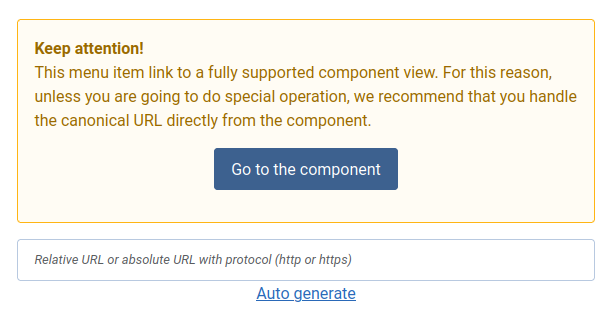Plugin warning message